


Business: business@xtoolonline.com
Social Media Cooperation: Media@xtoolonline.com
Support: support@xtoolonline.com

Wondering about the difference between a WiFi connection and a Bluetooth connection for your OBD2 scanner?
The difference between a WiFi connection and a Bluetooth connection isn't just about wireless technology. For automotive diagnostics, it affects live data speed, ECU programming stability, and even whether a repair session finishes successfully. Choosing the right connection depends on how you actually use your scanner.
For car diagnostics, the answer is simple:
| Feature | Bluetooth OBD2 | WiFi OBD2 | Diagnostic Impact |
|---|---|---|---|
| Data Speed | Up to 2–3 Mbps | Up to 433+ Mbps | WiFi is ideal for live data and ECU programming |
| Setup | Pair once, reconnect automatically | Connect to the scanner's WiFi network | Bluetooth is easier for everyday use |
| Phone Internet | Cellular data stays active | Some scanners occupy WiFi | Bluetooth makes online research easier |
| Stable Range | About 30 ft (9 m) | Up to 150 ft (46 m) | Better for large repair shops |
If your scanner is mainly used to read and clear fault codes, Bluetooth is usually the better choice. If you regularly perform coding, bidirectional control, or monitor multiple live data streams, WiFi offers a significant advantage.
The biggest difference between a WiFi connection and a Bluetooth connection becomes obvious when viewing live data.
An OBD2 scanner constantly receives PID data from the vehicle's ECU through the CAN-Bus network. The more sensors you monitor simultaneously, the more bandwidth the wireless connection requires.
In our workshop testing, a WiFi scanner maintained a smooth live graphing at around 24 frames per second while displaying multiple engine parameters. A Bluetooth scanner performed well with basic monitoring, but after six PIDs were added, refresh speed dropped noticeably, creating roughly 0.5 seconds of latency.
That delay may not matter when checking coolant temperature, but it can hide short ignition timing spikes or intermittent misfires that last only a fraction of a second.
For professional diagnostics, smoother data often means finding the problem faster.

Here's a problem that specification sheets rarely mention.
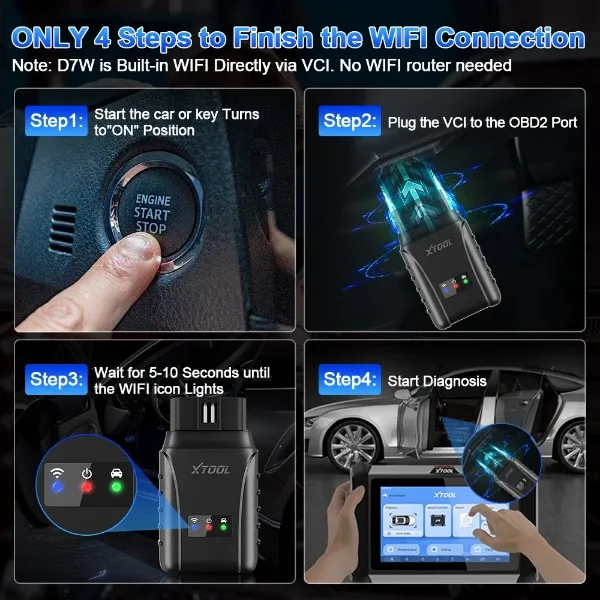
Many newer vehicles automatically connect your phone to Apple CarPlay or Android Auto through WiFi.
If your diagnostic scanner also requires a dedicated WiFi connection, your phone suddenly has to choose between the two networks.
The result is familiar to many DIY mechanics:
Many users blame the scanner when the real issue is network switching.
If you frequently use wireless CarPlay while diagnosing your vehicle, a Bluetooth car diagnostic tool is often the smarter solution. Bluetooth keeps the scanner connected while your phone continues using WiFi or cellular data for repair guides and technical information.
This is one reason many premium diagnostic platforms now offer dual wireless modes instead of relying on a single connection.
Not every diagnostic job carries the same level of risk.
Reading trouble codes is relatively forgiving. ECU flashing, module coding, and bidirectional control are not.
These functions continuously transfer large amounts of data between the scanner and the vehicle. Even brief packet loss can interrupt the programming process.
In a busy repair shop filled with lifts, metal equipment, battery chargers, and multiple wireless devices, Bluetooth operating on the crowded 2.4 GHz band is more likely to experience interference.
If communication fails during ECU programming, the module may become unresponsive—a situation technicians call "bricking the ECU." Recovering from this often requires dealership-level equipment and can become an expensive repair.
That doesn't mean Bluetooth is unreliable. It simply means WiFi—or a wired VCI connection—is the safer choice whenever programming or advanced diagnostics are involved.

The best wireless OBD2 scanner depends on your needs.
Choose a Bluetooth scanner if you:
Bluetooth is simple, reliable, and perfect for most DIY vehicle owners.
Choose a WiFi diagnostic scanner if you:
Although WiFi requires a little more setup, the additional bandwidth and longer operating range make it the preferred solution for advanced automotive diagnostics.
Sometimes. Some iOS and Android devices prioritize the scanner's WiFi connection, which may disable internet access. Adjusting your network settings can allow diagnostics and mobile data to work together on certain devices.
Newer Bluetooth versions improve stability, range, and efficiency, but they cannot completely overcome bandwidth limitations. For heavy live data streaming or ECU programming, WiFi still provides more consistent performance.
During engine cranking, battery voltage briefly drops at the OBD2 port. If the scanner's internal power management isn't robust enough, the wireless module may restart. A simple workaround is to start the engine first, then connect the diagnostic app.
When comparing the difference between WiFi and Bluetooth connections, there is no universal winner.
Bluetooth offers unmatched convenience for everyday diagnostics and code reading, while WiFi delivers the speed and stability needed for advanced live data analysis, coding, and ECU programming.
Instead of choosing the faster technology, choose the one that matches your diagnostic workflow. For most DIY drivers, Bluetooth is more than enough. For professional technicians handling dealership-level diagnostics, WiFi remains the better long-term investment.


Business: business@xtoolonline.com
Social Media Cooperation: Media@xtoolonline.com
Support: support@xtoolonline.com